Free vs. paid event website builders: the real tradeoffs
Discover the key differences between free and paid event website builders. Learn where the real costs lie, what features each tier offers, and how to choose the best platform for your event needs.
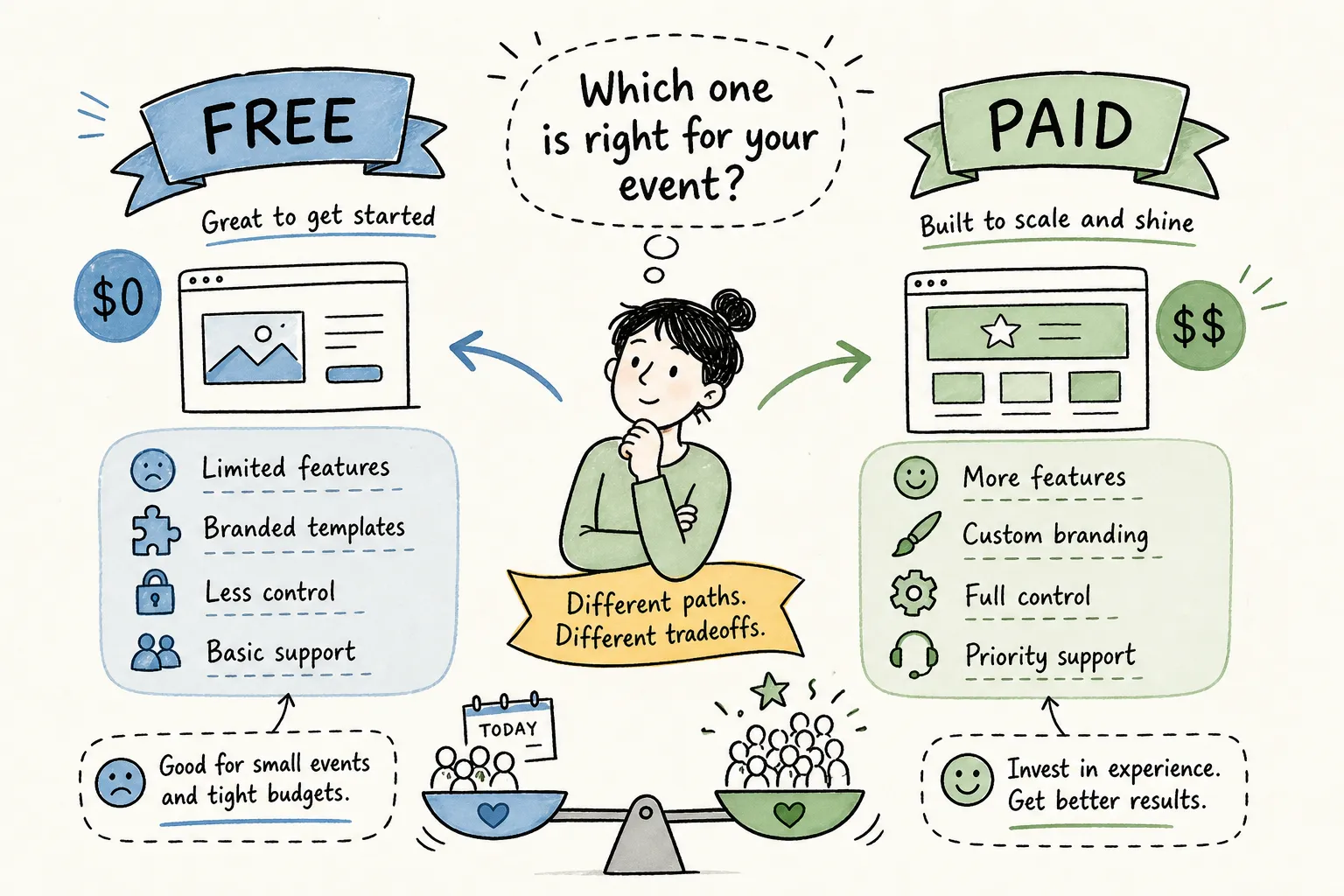
If you've ever wondered what are the differences between free and paid event website builders, the answer usually arrives the hard way. You find a free builder, spend an hour getting your page looking exactly right, and then hit a wall. The RSVP dashboard is locked. Your event URL reads yourevent.wixsite.com, not exactly the look you wanted on 200 printed invitations. And that blinking platform ad sitting right above your "Reserve Your Spot" button? It's not going anywhere unless you pay.
This isn't a pitch for paid platforms over free ones. It's a straight comparison of what each tier actually delivers, where the real costs show up, and how to match your choice to your event. The gap between free and paid has narrowed significantly in recent years. Platforms like My Joyfullday have made professional event tools genuinely accessible without requiring a computer, a web designer, or a steep learning curve. But that doesn't mean every paid plan is worth it, or that every free plan is a bad idea. The answer depends on your event.
By the end of this article, you'll have a clear checklist of must-have features and a confident answer on which direction fits your situation.
What free event website builders actually give you
The four restrictions that matter most
Free plans from builders like Wix, SITE123, and Webador all share a familiar set of constraints. You get a subdomain instead of a custom URL, platform branding that stays visible on your page, storage capped around 500 MB, and bandwidth limits that typically sit around 500 MB per month, figures confirmed for Wix's free tier and broadly consistent with similar free-plan policies across general-purpose builders. Each one of these limitations hits differently when you're running an event page.
A subdomain looks fine in a browser tab, but it looks unprofessional on a printed save-the-date or in an email campaign. Platform ads sitting on your event page pull your guests' attention away from the one button you need them to click: RSVP or Buy Ticket. And 500 MB of monthly bandwidth means your page can buckle under a rush of visitors, which is exactly what happens when you send out a batch invite and 300 people click the link at once.
Event-specific features locked behind free plans
The storage and bandwidth issues are frustrating, but the missing features are the real problem. Free plans almost universally strip out native ticketing and payment processing, advanced RSVP tracking, third-party integrations like Google Analytics and Facebook Pixel, and any form of e-commerce for ticket sales. These aren't edge-case features; they're the core tools event organizers actually need.
When those features aren't available, the workaround is usually a patchwork of third-party tools bolted onto your free page. That friction shows up in your registration numbers. Every extra step a guest has to take to RSVP or buy a ticket is a point where they drop off. Conversion research consistently finds that adding friction to a registration flow can cut form completion rates from around 75% down to 55% or lower, a hidden cost that far exceeds most paid platform subscription fees.
Which free platforms come closest to event-ready
Wix is generally considered the strongest free option for events, offering over 200 event-specific templates and a reasonably clean editor. Even so, the bandwidth cap and persistent platform branding make it a tough sell for any event with 50 or more guests, ticket sales, or a professional presentation requirement. "Closest to event-ready on a free plan" still means significant compromises.
What paid event platforms actually unlock
Ticketing, payments, and real registration workflows
Paid tiers bring the infrastructure that free plans can't support: built-in ticket sales, secure payment processing, and registration flows that don't require third-party workarounds. Wix Business Premium at $17/month adds online ticket sales with a 2.5% service fee. Squarespace's paid plan starts at $16/month and includes secure payments. Eventbrite operates on a per-ticket model at 3.7% + $1.79 per ticket, which works well for smaller events but scales up in cost for larger ones.
Planning Pod and Accelevents go further, bundling ticketing, CRM integrations (Salesforce, HubSpot), and registration management into tighter, purpose-built packages. These are worth considering for corporate events or conference-scale productions where CRM connectivity matters.
Custom branding, domains, and professional presentation
A custom domain does more than look clean. It signals to guests that the event is legitimate and well-organized, it's easier to remember and share, and it doesn't carry the implicit "this is a test project" message that a branded subdomain does. In observed tests and SEO analyses, custom domain pages consistently outperform subdomain-based pages on click-through rates, some comparisons showing 2 to 3 times higher CTR from both search results and social sharing. That difference matters when you're trying to fill seats.
Removing platform ads from your event page has an equally direct effect. UX research on distraction and form completion consistently supports a straightforward conclusion: a page without competing visual noise keeps guests focused on the registration flow, and that focus shows up in higher completion rates.
Analytics and integrations that help you optimize
Paid plans give you access to real performance data: traffic sources, user behavior, and the specific points in your registration flow where people drop off. That's actionable information. Free plans offer surface-level traffic summaries at best, with no way to connect the dots between your marketing channels and your actual registrant numbers.
On the SEO side, paid plans include technical refinements that free plans skip: site speed optimization, mobile performance tuning, and schema markup for events. If you're promoting a public event through search, these factors directly affect whether your page appears where potential attendees can find it.
Guest management and data ownership: the differences between free and paid event website builders
RSVP tracking and real-time guest management
For most event organizers, guest management is where the free-vs-paid decision gets settled. Free plans typically offer basic RSVP collection: someone fills out a form, you get a notification. That's the full extent of it. There's no real-time tracking dashboard, no plus-one management, no automated reminders going out to guests who haven't responded, and no way to see your RSVP status at a glance without exporting a spreadsheet.
Paid platforms deliver actual dashboards where you can see who's confirmed, who's pending, who's bringing a plus-one, and who needs a follow-up reminder. That visibility removes hours of manual tracking from your planning process and reduces the risk of last-minute surprises on event day.
Who owns your attendee data on a free plan
This is the detail most organizers discover too late. On free plans, your attendee lists and payment records live on the platform's servers, with limited or no export capabilities. Eventbrite's organizer terms go further: the platform explicitly claims ownership of Marketing Data, including attendee lists, regardless of whether you're on a free or paid plan. That data doesn't come with you if you decide to switch platforms.
If the platform changes its pricing, shuts down a feature, or you simply want to move your event to a different tool, you may find yourself rebuilding your guest list from scratch. For a one-time casual gathering, that's an inconvenience. For a business running regular events, it's a serious operational risk.
Export capabilities and portability on paid plans
Paid tiers from platforms like Webflow, Squarespace, and purpose-built event tools give you full data portability: attendee lists, form submissions, and payment records in standard exportable formats. This is non-negotiable if you're collecting paid registrations or building a guest database you'll use again. Own your data from the start, and you keep your options open.
How your platform choice affects SEO and registration conversions
Why free plan SEO falls short for event discovery
Free subdomains are treated as separate entities by Google, which means backlinks and engagement signals don't accumulate toward a single, authoritative domain. They start from zero every time, and they're filtered out of competitive search results more often than organizers realize. If your event relies on organic discovery, a subdomain-based page is working against you before anyone even clicks.
Paid plans include the technical foundation that search visibility requires: SSL certificates, faster load times, mobile optimization, and event schema markup that tells search engines exactly what your page is about. These aren't bonus features; they're the baseline for a page that can actually rank.
The conversion rate difference between free and paid event pages
Purpose-built paid event landing pages consistently generate higher-quality registrations and paid conversions compared to free native forms. A campaign analyzed by AI Advantage Agency achieved an 18% increase in signups and an 18% reduction in cost per registration by routing prospects to a dedicated, optimized landing page instead of a free embedded form. The free form generated more raw volume; the paid page generated more paying attendees.
The math on completion rates makes the case clearly. A 20-percentage-point drop in registration form completion, from 75% to 55%, translates directly into lost attendees. For an event targeting 200 registrants, that's 40 people who started and didn't finish. No free plan saves you money when it's costing you that many seats.
When free is the right call and when it becomes a false economy
Scenarios where a free plan genuinely works
Free plans aren't universally wrong. They're a reasonable fit for small, informal gatherings with under 50 guests where the event URL doesn't appear on any printed materials and no ticket sales are involved. An internal company announcement, a casual birthday invite, or a first-draft test of an event concept can all live comfortably on a free plan without meaningful cost.
The key distinction is stakes. When the audience already knows and trusts the organizer, and when RSVPs are being tracked by a group chat rather than a dashboard, the limitations of a free plan don't cause real problems.
Signs you've outgrown a free plan
The moment any of the following apply to your event, a free plan becomes a false economy:
- You're selling tickets or accepting payments, and free plans either block this or route guests through a clunky third-party flow
- You're promoting the event publicly and need a clean, credible URL and SEO visibility
- You need real-time RSVP tracking, plus-one management, or automated reminders
- You want to export your attendee data after the event and use it again
- Your guest list exceeds 50 people and a registration spike could take your page offline
A free tool that drops your registration completion rate by 20 points isn't free. You're paying for it in missed attendees, not in dollars, and that's a harder cost to recover from.
My Joyfullday: the paid option built for people, not for developers
Professional features without the complexity
My Joyfullday sits in the space between "free and limited" and "paid but complicated." The platform includes unlimited guest management with real-time RSVP tracking, plus-one support, a built-in gift registry with cash fund options, automated reminders, privacy controls, and multi-language support. All of it is accessible from a single dashboard. The platform has processed events at genuine scale, tens of thousands of events and well over a million guests managed, which makes the feature depth feel earned rather than promised.
The features match what traditional paid platforms offer, but the way you access them is where My Joyfullday breaks from the pack. There's no steep learning curve and no desktop-first setup required.
A WhatsApp-native workflow anyone can use
My Joyfullday works entirely through a WhatsApp conversation with an AI assistant named Jitabi. You build your event page, manage your guest list, and track RSVPs without opening a browser on a desktop, downloading a new app, or navigating a dashboard you've never seen before. Your event website comes together in minutes, built from a library of customizable templates covering weddings, birthdays, graduations, baby showers, anniversaries, and corporate events.
This flips the usual assumption that paid platforms are more complex than free ones. My Joyfullday puts professional-grade tools inside the messaging app already on your phone, making it a practical fit for non-tech-savvy parents, multilingual families coordinating guests across languages, and independent event planners managing multiple clients at once.
How it compares to traditional paid platforms
Eventbrite charges 3.7% + $1.79 per ticket, plus payment processing fees that compound quickly on larger events. Wix Business Premium costs $17/month and still adds a 2.5% ticket service fee on top. Both platforms are primarily designed around desktop workflows and carry a setup learning curve that pulls time away from actual planning. My Joyfullday offers a professional event management experience at a flat subscription rate with no per-ticket fees, removing the desktop requirement, the technical skills assumption, and the fee model that gets more expensive the more successful your event becomes.
Your decision, simplified
Free plans work for small, informal, ticket-free events where the URL doesn't matter and the guest list fits in a group chat. The moment you need a custom domain, ticket sales, real-time RSVP tracking, or the ability to own and export your attendee data, a paid platform pays for itself quickly. The math on completion rates, conversion quality, and data portability all point in the same direction.
Paid no longer means expensive or complicated. Platforms like My Joyfullday have made it possible to get a professional event website through a WhatsApp chat, with no coding, no computer, and no agency fee required. The barrier to a great event page is lower than it's ever been, and understanding what are the differences between free and paid event website builders is the first step to making the right call.
If you're still weighing your options, run through this checklist: Do you need a custom domain? Will you be selling tickets or accepting payments? Do you need real-time RSVP tracking or plus-one management? Will you want to export your attendee list after the event? If you answered yes to any of these, you already have your answer. Start with My Joyfullday, your event page will be up and running before you know it.
Software engineer writing about the craft of building products on the web.