WhatsApp bot for events: automate sign-up to check-in
Discover how a WhatsApp bot for events can automate registration, payments, reminders, and check-ins, drastically reducing no-shows and streamlining your event management in Kenya.
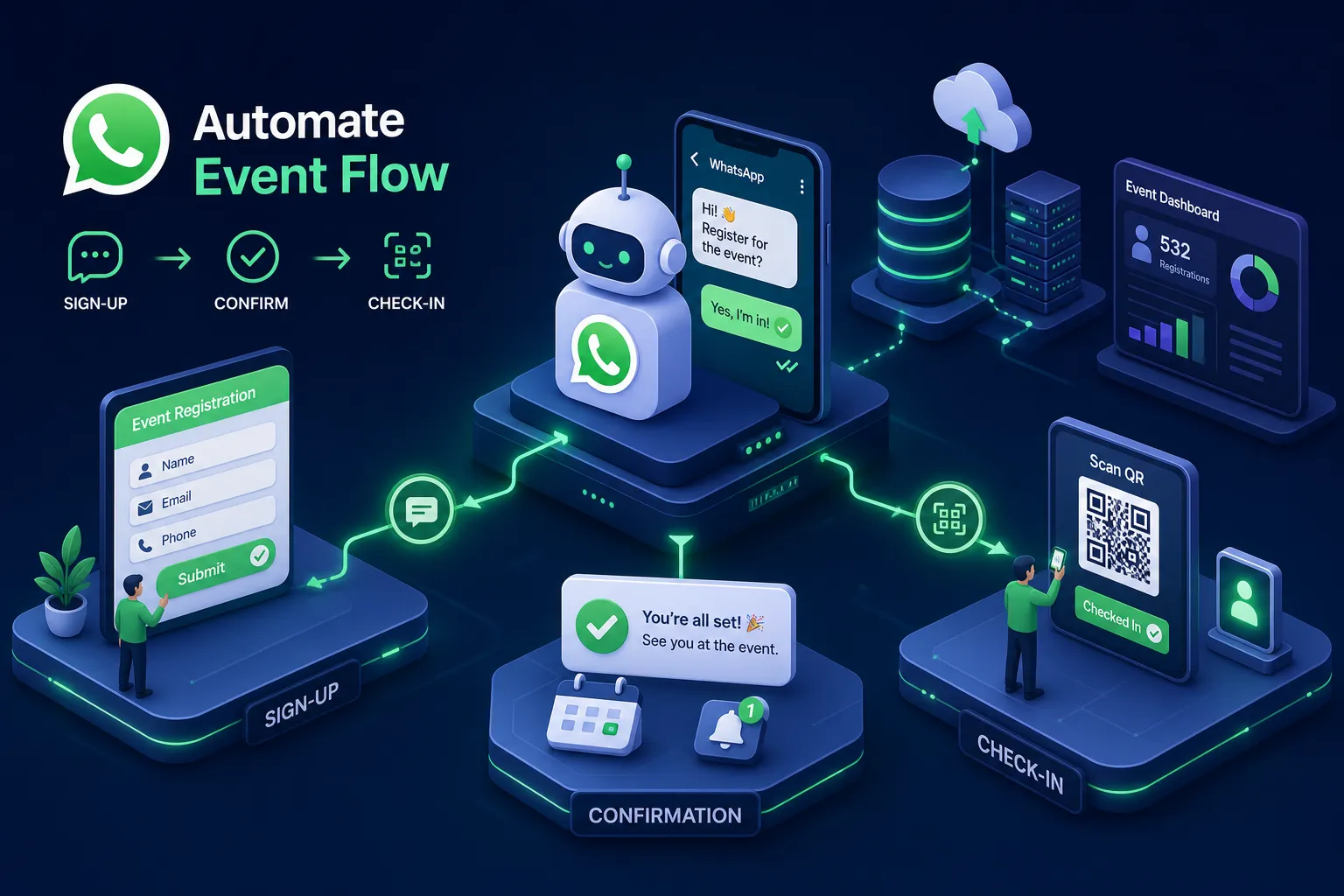
Event organisers in Kenya know the pain well: you send out registration links, chase RSVPs on personal WhatsApp, resend payment confirmation requests manually, and then watch 30 to 40 percent of confirmed attendees simply not show up on the day. The venue is booked, the catering is ordered, and half the seats are empty. It is expensive, demoralising, and entirely preventable. A WhatsApp bot for events solves this from the first registration message right through to the check-in gate, automating every step that currently falls on you or your team.
A properly built WhatsApp bot for events handles the entire attendee journey automatically, and the technology is no longer experimental. These bots are already running in production for organisers across Kenya, handling registration, payments, reminders, and check-ins at scale without manual intervention. This guide walks you through exactly how they work, how to set one up, what it costs, and how to decide whether to build or buy.
This guide walks you through exactly how these bots work, how to set one up, what it costs, and how to decide whether to build or buy.
What a WhatsApp bot for events actually handles
Most organisers think of a WhatsApp RSVP bot as a simple confirmation tool. In practice, a well-built WhatsApp event bot covers the entire attendee journey inside a single channel, without asking anyone to visit a website or switch apps.
Registration and RSVP collection
The bot collects name, contact details, ticket type, and payment confirmation inside a single WhatsApp conversation. As each attendee responds, their data syncs automatically in real time to Google Sheets, HubSpot, Eventbrite, or whichever event management tool you use. The organiser sees a live registration list without chasing anyone manually. WhatsApp chatbots convert 25 to 40 percent of interactions into completed registrations, compared to 2 to 5 percent for standard web forms, a meaningful gap that makes the channel genuinely worth building on.
Attendee Q&A and pre-event communication
The bot handles common pre-event questions around venue, agenda, parking, and dress code using a structured menu or AI-assisted free-text replies. Attendees get instant answers at any hour, and the organiser's personal WhatsApp number stays quiet. This matters more than most organisers expect: unanswered queries before an event are one of the primary reasons people decide not to attend.
Check-ins on the day
After registration, the bot sends each attendee a unique confirmation code or QR code directly in the WhatsApp chat. At the gate, a volunteer scans or verifies the code using a smartphone. No printed lists, no name searches, no queue bottlenecks. If an attendee loses their code, they message the bot a keyword and receive an instant resend. The whole check-in process speeds up significantly at larger events, which is where manual processes break down most visibly.
How to set up the registration and confirmation flow
The setup process has two main routes, and choosing the right one early saves weeks of backtracking later.
Choosing between Meta Cloud API and a BSP
Building directly on the Meta WhatsApp Business API gives you the most control over the bot's behaviour, payment flows, and integrations, but it requires a developer to configure webhooks, handle message templates, and manage error states. Using a Business Solution Provider (BSP) like Interakt or a local Kenyan BSP gets you live faster with a no-code drag-and-drop builder, but you pay a monthly platform fee on top of Meta's per-message charges. If your event flow is straightforward and recurring, a BSP works well. If you need M-Pesa STK Push, multi-tier ticketing, or CRM integrations, the direct API route delivers more.
Building the chatbot workflow: the key steps
The core setup sequence runs as follows: create a WhatsApp Business Account via Meta Business Manager, verify your business phone number, and submit your message templates for approval. Confirmations and receipts fall under the Utility category, while event announcements and promotional messages fall under Marketing. The display name approval typically takes 48 hours, and full template approval runs three to seven business days. Before sending any Marketing messages, you must collect explicit opt-in consent from attendees, either through a registration form or a "Reply YES to receive event updates" prompt inside the chat. Skipping this step risks your account being flagged or blocked.
Reminder sequences that reduce no-shows
A single reminder the night before makes little measurable difference. WhatsApp reminders reduce no-show rates by 35 to 40 percent compared to email reminders alone, largely because WhatsApp carries a 98 percent open rate against email's 18 to 25 percent. But the channel advantage only holds when the timing is right.
The timing that works: a five-touch cadence
The most effective reminder structure for WhatsApp event automation uses five touchpoints:
- An immediate RSVP confirmation sent the moment registration completes
- A seven-day reminder that gives attendees time to reschedule if needed
- A three-to-four day reinforcement message to keep the event prominent
- A 24-hour final reminder with preparation instructions
- A two-hour last-minute alert for high-risk no-shows
The 24-hour message carries the heaviest lift and should include everything the attendee needs to show up prepared: what to bring, where to park, what time to arrive. If a recipient does not confirm after the 24-hour message, escalate to a direct call rather than sending another text.
Message templates with real copy examples
Here is what effective templates look like in practice:
- RSVP confirmation: "Hi [Name], your registration for [Event Name] on [Date] at [Venue] is confirmed. Reply YES to confirm your spot or NO to cancel. See you there!"
- 24-hour reminder: "Reminder: [Event Name] is tomorrow at [Time], [Venue]. Please bring your ID and arrive 15 minutes early. Your entry code is [Code]. Reply YES to confirm you're coming."
- Post-no-show follow-up: "Hi [Name], we missed you at [Event Name] today. Reach out if you'd like to attend the next one. Reply STOP to opt out."
Classify confirmations and receipts as Utility templates (approximately KES 0.80 per message) rather than Marketing templates (approximately KES 5.20 per message). The classification affects both approval speed and your messaging budget significantly, especially at scale.
Collecting payments inside WhatsApp using M-Pesa
For Kenyan event organisers, M-Pesa payment integration inside the chat removes the single biggest drop-off point in the registration flow, no website redirect, no separate payment link, no manual reconciliation.
How the STK Push flow works inside the chat
The attendee selects a ticket type inside the WhatsApp conversation. The bot triggers a Daraja API call that sends an STK Push directly to the attendee's phone. The attendee enters their M-Pesa PIN, the transaction completes, and the bot immediately sends a confirmation message with the transaction ID and a digital receipt, all within the same chat window. The payment sequence typically completes within seconds when the integration is built correctly. Failed transactions and timeouts are handled automatically, with the bot prompting the attendee to retry rather than leaving them stranded.
Setting up a WhatsApp bot for events with M-Pesa: platforms and developers
For non-technical organisers, platforms like Chatbiz and BossBot AI offer pre-built M-Pesa integrations that do not require any coding from the organiser. For organisers who need custom reconciliation logic, multi-event payment tracking, or error handling that matches their business rules, a custom-built bot using the Safaricom Daraja API directly is the better route. All options require a verified Safaricom business account and an active Daraja API account before any live payments can be processed. Sandbox testing is available through the Daraja developer portal using test credentials before you go live.
What WhatsApp API messaging costs in Kenya
Pricing is one of the most misunderstood parts of building a WhatsApp ticketing bot, and getting it wrong makes budgeting painful later.
Meta's per-message rates (verify current figures on the official Meta pricing page, as rates are updated periodically) break down by template category. Marketing messages, which cover event announcements and invites, cost approximately KES 5.20 per message. Utility messages, covering confirmations and receipts, cost around KES 0.80 per message. Service messages, replies sent within the 24-hour customer-initiated window, are free. For a 500-person event using a five-touch reminder sequence, your Meta messaging costs will vary depending on how many touchpoints are classified as Marketing versus Utility; at KES 5.20 per Marketing message and KES 0.80 per Utility message per attendee, the per-person cost can add up quickly at scale. Template category decisions are therefore a budgeting decision, not just a compliance one.
BSP monthly fees in Kenya run from KES 5,000 for basic plans to KES 60,000 for enterprise, with one-time setup fees between KES 8,000 and KES 15,000 per number, all excluding 16 percent VAT. Unverified accounts are capped at 250 unique users per day, which is sufficient for pilot testing. Verified accounts unlock 1,000 or more contacts per day, which covers most mid-sized events without hitting rate limits.
Build it yourself or bring in a developer
The right choice depends on the complexity of your event workflow, not budget alone.
When a no-code platform is enough
A BSP with a drag-and-drop builder works well for organisers running recurring events with standard registration flows, single-tier ticketing, and no complex payment logic. If your event is under 500 attendees and the workflow is straightforward, a platform can often get you live in days to a few weeks, depending on template approvals and integration requirements. The trade-off is limited flexibility: when your needs evolve, the platform's constraints become the ceiling.
When you need a custom-built WhatsApp bot for events
Custom development makes sense when you need M-Pesa STK Push with reconciliation logic, multi-event management from a single number, AI-assisted attendee Q&A, or integrations with an existing CRM or ticketing system. This is exactly what Alvine Otieno builds. His custom WhatsApp bots are built for production, with edge cases, timeout flows, and payment failure handling designed from the ground up for Kenyan event organisers who cannot afford surprises on the day. Working with an experienced developer removes months of trial and error and delivers something that is actually reliable when it matters most.
Get your event bot running before the next one
A WhatsApp bot for events handles registration, sends timed reminders that measurably cut no-shows, processes M-Pesa payments inside the chat, and manages check-ins at the gate without manual follow-up from the organiser. The technology is mature, the costs are predictable, and WhatsApp Business API access is available to any verified Kenyan business.
Whether you use a platform or build something custom, the key is getting the reminder sequence right and making payment frictionless. Those two decisions alone will determine whether your attendance rate improves meaningfully or continues to fall short of confirmed registrations.
If you want a WhatsApp bot for events built to your exact workflow, with M-Pesa integration, QR check-in, and reminder sequences configured from the start, reach out to Alvine Otieno and describe what you need. The first conversation is free, and most builds are live within two to three weeks.
Frequently asked questions
What is a WhatsApp bot for events?
A WhatsApp bot for events is an automated system built on the WhatsApp Business API that manages the full attendee journey, registration, payment, reminders, and check-in, inside a single WhatsApp conversation, without requiring the organiser to follow up manually.
How does a WhatsApp QR code check-in system work?
After registering, each attendee receives a unique QR code or confirmation code via WhatsApp. At the venue entrance, a volunteer scans the code on a smartphone to verify attendance instantly. If an attendee loses their code, they can message the bot a keyword to receive an immediate resend.
Do I need a developer to set up a WhatsApp bot for events in Kenya?
Not always. No-code BSP platforms allow organisers to build standard registration and reminder flows without writing code. However, if you need M-Pesa STK Push integration, multi-tier ticketing, or custom CRM connections, a developer familiar with the WhatsApp Business API and Safaricom Daraja API is the more reliable route.
How much does WhatsApp event automation cost in Kenya?
Costs depend on message volume and the platform or developer you use. Meta charges per message by template category, Marketing messages cost approximately KES 5.20 each, while Utility messages cost approximately KES 0.80. BSP platform fees range from around KES 5,000 to KES 60,000 per month depending on plan tier, plus setup fees. Always verify current Meta rates directly, as pricing is updated periodically.
Can a WhatsApp bot collect M-Pesa payments?
Yes. A WhatsApp ticketing bot integrated with Safaricom's Daraja API can trigger an M-Pesa STK Push directly from the chat. The attendee enters their PIN, the payment confirms, and the bot sends a receipt, all without leaving WhatsApp.
Software engineer writing about the craft of building products on the web.